
Play Klondike Solitaire online for free and enjoy the most famous single–player card game. Build foundation piles from Ace to King, clear the tableau, and relax with a calm, smart challenge in your browser.
This version of Klondike Solitaire runs in HTML5, so it works on laptop, tablet, and mobile. No account, no download, and no payment are needed to start. You can try quick games during a short break or sit for a longer card session inside our Solitaire Games collection.
Klondike Solitaire is the classic solitaire card game many people learn first. You play with a standard 52–card deck and try to move all cards to four foundation piles. Each foundation pile is sorted by suit, from Ace up to King. The challenge comes from limited moves and hidden cards in the tableau columns.
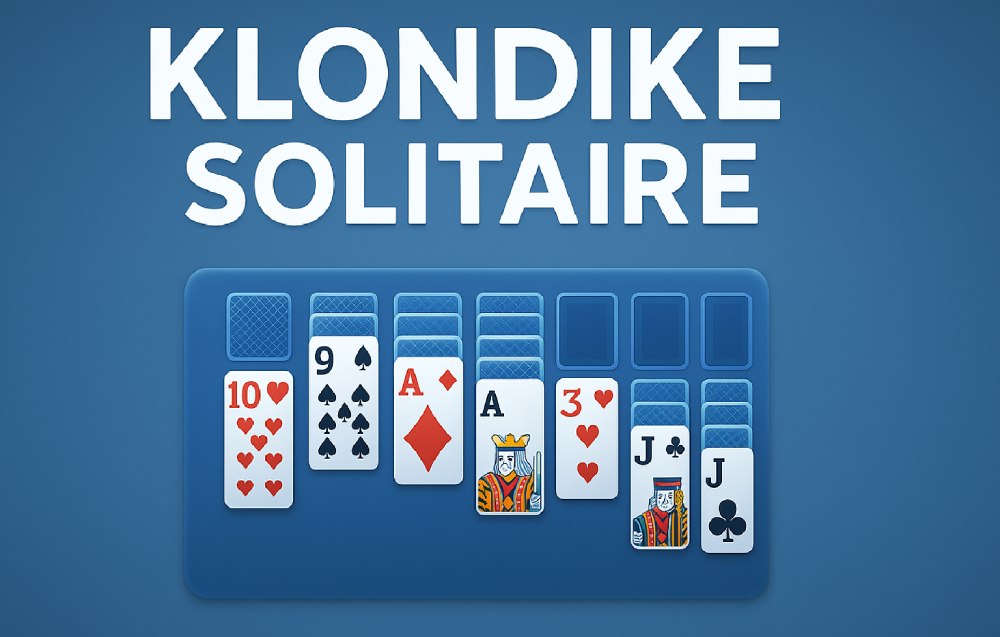
The tableau is the main play area with seven columns of overlapping cards. Only the bottom card in each column is face up at the start. Above the tableau you have the stock pile, waste pile, and the four foundations. You reveal new cards from the stock, place them into the tableau or foundations, and slowly open more of the layout.
Many players use Klondike Solitaire to relax, train focus, or pass time during small breaks. The rules are easy to learn, but each layout feels fresh and slightly different. Sometimes you win smoothly, other times you must think many moves ahead and plan carefully.
Our online Klondike Solitaire keeps the traditional feel while adding smooth animations and useful options. You can undo moves, toggle sound, and choose between draw–one or draw–three rules if the game supports it. This makes the game friendly for both beginners and experienced card lovers who want a familiar solitaire online.
Every game of Klondike Solitaire starts with seven tableau columns. The first column has one card face up, the second has two cards with one face up, and so on until the seventh column. All hidden cards are face down until you free them with smart moves.
You build the tableau columns in descending order while alternating colors. That means you place a red card on a black card, or a black card on a red card, with the next lower rank. For example, you can place a red 7 on a black 8. This simple pattern drives most of the strategy.
At the top, the four foundation piles start empty. When you find an Ace, you move it to a foundation pile. After that, you place cards of the same suit in ascending order on that Ace. You win when all four suits are complete from Ace to King.
The stock pile holds all remaining cards that are not in the tableau. When you cannot find more moves in the columns, you draw from the stock. Drawn cards usually move first to the waste pile, then you may move them into the tableau or directly to a foundation if they fit.
Many online versions offer both draw–one and draw–three modes. Draw–one is easier and suits new players who want more control. Draw–three is harder and rewards planning several moves in advance. Both modes keep the same basic rules and victory goal.
This browser version of Klondike Solitaire runs directly in your internet browser on desktop, tablet, and mobile. It saves you from extra installs, plug–ins, or heavy files, so you can focus only on smart card moves and smooth card stacks.
Start by scanning the tableau and checking which face–up cards are already playable. Look for moves that reveal hidden cards in deeper columns. Turning face–down cards face up usually opens new paths and creates more options later.
Move cards in the tableau to follow the descending, alternating color rule. Build long chains like black 9, red 8, black 7, red 6, and so on. When you move a full chain, you may uncover a hidden card under it, which is often very helpful.
Whenever you see an Ace, send it to a foundation pile quickly. After that, place higher cards of the same suit on top of it. Building foundations steadily is the only way to clear the board and finish the game.
Use the stock pile when no clear moves are present in the tableau. Draw a new card, then check if it can fit on a tableau column or foundation. If you play in draw–three mode, think about the card order and future draws before you move.
Empty tableau columns are precious. Only a King, or a stack starting with a King, may move into an empty column. Try not to leave empty spaces wasted. Move a King there only when it helps open more face–down cards or improves your layout.
Do not rush every possible move to the foundations. Sometimes keeping a card in the tableau gives more flexibility for color patterns. With practice, you learn when to push cards to the top and when to keep them lower for another turn.
First, look for any face–up cards that can move into other tableau columns. Favor moves that uncover face–down cards. Turning hidden cards face up usually brings new options and is a safe early plan.
Next, scan for Aces and low cards such as twos and threes. Move Aces to the foundations as soon as you see them. Then move matching low cards on top when the suit fits. This gives your foundation piles an early push toward victory.
The main objective in Klondike Solitaire is simple. Move all 52 cards to the four foundation piles. Each foundation must hold one full suit in ascending order from Ace to King.
You lose or fail a game when no more legal moves are possible. This can happen even if cards remain in the tableau or stock. Some layouts are unwinnable from the start, which is part of the charm of this classic solitaire game.
Many online versions include score systems, timers, and move counters. You might try to win as often as possible, beat your best time, or finish with fewer moves. You can set your own personal goals based on your mood and skill level.
The controls in Klondike Solitaire are simple and easy to learn on any device.
On desktop, you usually use the mouse for every action. Left–click a card to select it, then click another card or pile to place it. You can also click and drag card stacks if the game supports it.
Many versions add shortcuts for actions such as undo, restart, or moving cards automatically to foundations. Check the on–screen buttons or help icon for a quick list. Simple mouse control keeps the game natural and comfortable even during long card sessions.
On phones and tablets, Klondike Solitaire usually uses tap controls. Tap a card once to select it, then tap the target card, foundation, or column. Some games let you drag with your finger, which feels close to moving real cards on a table.
Buttons for undo, new game, or settings sit near the bottom or top of the screen. Tap them with your thumb to adjust sound, animations, and draw mode. Touch control keeps the game friendly for quick breaks on the go.
A few browser and app versions support gamepads. In these, the stick or D–pad moves a focus highlight between cards and piles. A main button selects or places cards, and other buttons handle undo and new game actions.
This setup feels slower than mouse or touch, but some players enjoy it on smart TVs or consoles. It turns Klondike solitaire into a relaxed couch card game with simple, clear controls.
Small habits create big gains in this card game. Try to reveal hidden cards early, keep color patterns open, and plan several moves in your head before acting. With steady practice, you will understand layouts faster and feel more confident.
This online version keeps the classic rules while adding handy quality–of–life tools.
Klondike Solitaire feels both calm and smart at the same time. Each move is small, yet you slowly build a full layout from scattered cards. That mix keeps your mind active while your body relaxes.
Random shuffles ensure you rarely see the exact same layout twice. Some games feel easy, others feel stubborn and tight. This variety gives the game strong replay value and keeps players returning for “just one more round”.
Because the rules are simple, families can share the game easily. Parents, teens, and younger players can sit together, talk about moves, and enjoy the shared challenge.
If the game feels slow or cards lag, try refreshing the page first. A simple reload often clears minor browser issues. You will usually return to a new shuffled layout.
Close heavy browser tabs that use video or large downloads in the background. Freeing memory and network bandwidth can make card movements smoother. This is especially important on older laptops and low–end phones.
Check that your browser is up to date. Modern versions handle HTML5 games better and run animations more smoothly. If possible, turn on hardware acceleration in the browser settings as well.
On mobile data, weak signals may cause slow loading. Switch to a stable Wi-Fi connection when you can. This shortens loading time and keeps moves responsive during long games.
If the layout appears too small or too large, use your browser zoom or rotate your device. Playing in landscape mode often gives more comfortable space for the tableau and foundations.
Online Klondike Solitaire games may receive small updates over time. These can include cleaner card art, smoother animations, bug fixes, or new score options. Some sites also add seasonal backgrounds or themes during holidays.
Yes, you can play this version of Klondike Solitaire for free in your browser. There is no need to pay for a deck, a download, or any special pass to start.
Some sites show small banner ads around the play area. These ads help cover hosting and development costs while keeping the game free for everyone. Ads should not block your view of the cards.
You usually do not need to create an account. You can open the page, press new game, and start placing cards within seconds.
Playing Klondike Solitaire on a trusted HTTPS site is generally safe. The game runs directly in your browser and uses standard web technology like HTML5 and JavaScript.
You do not need to install extra plug–ins or run unknown files. This reduces the risk of downloading harmful software or unwanted toolbars. Always be careful with pages that ask you to install strange “solitaire helpers”.
Stick to sites with clear privacy policies and simple ad layouts. Avoid pages that open many pop–ups or ask for personal details before you play. A good solitaire site lets you enjoy the game with minimal data collection.
As always, keep your browser, system, and antivirus tools up to date. These protect you in the background while you focus on stacking suits and finishing clean games.
Many players want to enjoy Klondike solitaire at school or in the office. To play unblocked, use a site that runs over HTTPS and does not require extra installs. Often, such sites bypass simple filter rules based only on file types.
If the game page is blocked on one network, try another device or connection at home. You can also test a different browser. Avoid using third–party “unblocker” tools that ask for strange permissions or extra downloads.
The game offers a nice balance between luck and skill. Shuffled cards bring surprise, while smart planning improves your odds. This mix keeps your mind interested without feeling stressful.
Games are short, so you can play one during a break or a long set during a quiet evening. Even a lost game can feel useful because it teaches better move order for next time.
Finally, Klondike Solitaire needs only simple focus. There is no story to track, no complex rules, and no pressure to play with others. You can relax, think in silence, and enjoy clear visual progress as the foundations grow.
If you enjoy this classic solitaire card layout, you will likely enjoy other patience games too. Here are some great options you can try next.
Spider Solitaire: Build sequences in the same suit and clear columns in a deeper, more tactical game.
FreeCell Solitaire: Use open cells to move cards freely and solve layouts that depend more on pure planning.
Pyramid Solitaire: Match card pairs that add up to 13 and slowly clear a pyramid–shaped layout.
Tri Peaks Solitaire: Clear three small mountains of cards by moving one rank above or below the top card.
For more titles like these, visit our full Solitaire Games section and pick your next card challenge.
• On Android: Open Google Play and search for a well-rated Klondike Solitaire app, then follow the steps.
• On iOS (iPhone/iPad): Go to the App Store, search for a trusted solitaire app, and press “Get”.
Some sites offer mod APK files that change scores, ads, or features. Use great care with these files. Only download APKs from trusted sources, and always scan them with security tools before installing.
In many cases, the safe browser version or official store app is the better option. You still enjoy the same classic solitaire game without extra risk to your device or your data.
It is a classic solitaire card game where you move cards to four foundation piles, sorted by suit from Ace to King.
You win when all 52 cards are moved to the four foundations in correct suit and rank order.
No, the rules are simple. Most new players understand the basics after a few short games.
Draw–one reveals one card at a time from the stock, while draw–three shows three cards, making the game harder.
Most online versions include an undo button. You can use it to correct mistakes or test different plans.
No. Some shuffled layouts are unwinnable, even with perfect play.
A quick game can last a few minutes, while a more complex layout may take ten minutes or more.
Yes. The HTML5 version works in mobile browsers, and many apps exist for phones and tablets.
You need internet to load the browser game. Some apps may also work offline after installation.
This rule keeps the game interesting. It stops players from filling spaces with any card and adds planning depth.
Not always. Sometimes it is better to keep a card in the tableau to help with color patterns.
Focus on revealing hidden cards, think ahead, and review lost games to see blocking moves.
In many versions, the waste pile turns into a new stock. Some rule sets limit the number of passes.
Yes. It is suitable for older children who can recognize card ranks and suits and enjoy thinking games.
It can help train focus, planning, and memory by asking you to track cards and plan moves.
Many online versions offer themes, backgrounds, and alternative card backs you can switch in settings.
Yes. Look for a sound or speaker icon in the interface to mute or adjust effects.
Random shuffles create easy and tough setups. Harder layouts often hide important cards deep in the tableau.
Yes, if you use official stores and known developers. Always check ratings and reviews first.
You can play on trusted HTTPS browser sites at home, and sometimes at school or work if the network allows game pages.
Klondike Solitaire is a timeless solo card game that mixes simple rules with thoughtful planning. It is easy to learn, yet it can keep you busy for many relaxing sessions.
Open a game, flip your first cards, and see how far you can push the foundations today. When you are ready for more, explore our wider collection of titles inside the Solitaire Games section.